Are you planning to set up an online shop from scratch? If so, one of the first items on your checklist will bechoosing a domain nameand hosting— in other words, the server on which your website’s files will be hosted.
This study, produced in collaboration with experts from hostpro.ua, will answer the questions that concern all business owners moving online:
- which domain zone (national, regional or thematic) is best to choose for an online shop;
- A new or old domain – which is better for a quick start;
- Are there any areas subject to restrictions?
- how much should you budget for domain registration and hosting;
- Which type of hosting should you choose for an e-commerce project: shared, VPS or a dedicated server?
Let’s start with domains.
National, regional, or niche — which domain should you choose for your online shop?
There is no consensus among SEO specialists regarding the importance of the domain zone for website promotion. Rankings are more likely to be influenced by domain authority, content relevance, effective link building and UX; however, from our own experience, we can say that national and regional domains inspire greater trust among visitors for local search results. And if people like it, search algorithms recognise that the website is relevant and rank it higher.
By ‘national domains’, we mean top-level domains that include a country code — .ua (Ukraine), .fr (France) — and by ‘regional domains’, we mean, for example, Ukrainian domains for a specific region — .kyiv.ua (Kyiv city and Kyiv Oblast).
If your online shop is aimedexclusively at a Ukrainian audience, choose the domain zone.ua, .com.ua or the Cyrillic .укр. But please note: if you later wish to enter new markets, you will have to register new local domains for other countries, as it will no longer be possible to implement multi-regionality using subfolders or subdomains.
The target audience is in Ukraine and there are no plans for multi-regional expansion ⇒ national domain zones .UA, .COM.UA, .УКР. International thematic domains can also be used .STORE, .SHOP, .CLOTHING.
The country code top-level domain (ccTLD) in France— the national domain .FR, in Poland — .PL, in the USA — .US.
Do you bake cakes or run a tyre fitting business in Vinnytsia or Lviv? In such cases, we recommend the regional Ukrainian domains: .vn.ua (.vinnytsia.ua) and .lviv.ua.
Target audience within a city or region ⇒ regional Ukrainian domain zone .KYIV.UA/ .VN.UA
International domain zones are universal domains for conducting business worldwide. If you are setting up a multilingual and/or multi-regional online shop, or are planning to do so, it is best to choose either the gold standard: .com, or .net.
Thematic domain zones (.shop, .store, .clothing, .shoes, .tech) — specialised international domain zones that help visitors identify the focus of your online shop.
Target audience across several countries ⇒ generic international domains.COM/.NET or niche domains such as .STORE, .SHOP, .CLOTHING etc.
New vs old domain
Many of our clients ask for advice on whether a new domain or an established domain is better for an online shop. Let us explain in simple terms.
No one has registered these new domains for you. Consequently, when you purchase them, you start your SEO campaign from scratch, including link building, driving relevant traffic, and building trust with both users and search engines. It’s a long and costly process, but it’s also safer.
Old domains are usually snapped up:
- if the domain in the desired zone has already been taken;
- if you are certain that the expired domain, which someone has failed to renew, is trustworthy, spam-free and related to your niche.
There is a fairly high risk of inheriting search engine filters and reputation issues along with the old domain. You can check the previous site’s subject matter and other SEO metrics using services such as Web.archive.org, Ahrefs, Serpstat and Semrush. You can automatically register trusted domains that have just become available via HostPro’s free service ‘Domain Backorder’. To do this, simply submit a request in your client account.
Domain zones with restrictions
Important! To register a domain in the .UA zone, you must own a trade mark that matches the domain name.
And if you choose the Cyrillic domain zone .УКР, please note that you will not be able to create an email address with a Cyrillic domain, unless it is in the format ‘@xn-d1acufc.xn-j1amh’.
How much does it cost to register and renew domains?
As they say, it depends… The cost of domains depends on the registrar, the domain extension (international domains are usually more expensive than Ukrainian ones), and the domain name itself (premium domains such as tesla.com can cost hundreds of thousands of dollars). The minimum domain registration period is one year, after which it must be renewed (note that the renewal price does not always match the registration price, so when purchasing a domain, pay attention to both amounts).
Premium domains are short, memorable domains that already have an owner and are resold on the secondary market at a higher price than new ones.
Let’s take the Ukrainian registrar HostPro as an example, along with the domains most commonly chosen for online shops:
| Domain zone | Registration fee | Price of the sequel |
| .сom | $19.75 / year | $19.75 / year |
| .ua | $63.80 / year | $63.80 / year |
| .com.ua | $13.07 / year | $13.07 / year |
| .kyiv.ua | $11.25 / year | $11.25 / year |
| .store | $13.00 / year(*special offer price) | $93.74 / year |
| .shop | $2.00 / year (*promotional price) | $56.99 / year |
Which type of hosting should you choose for e-commerce: shared, VPS or a dedicated server?
Web hosting
This type of hosting means that all the resources on the physical server are shared amongst all the websites hosted on it.
This is a suitable option if your traffic is around 1,500 visitors per day and you don’t opt for the entry-level plan. For a WordPress site, it is better to choose specialised CMS hosting with a LiteSpeed web server. You can then install the LiteSpeed Cache plugin for server-level caching and database optimisation ⇨ boosting performance.
Checklist for choosing a web hosting provider:
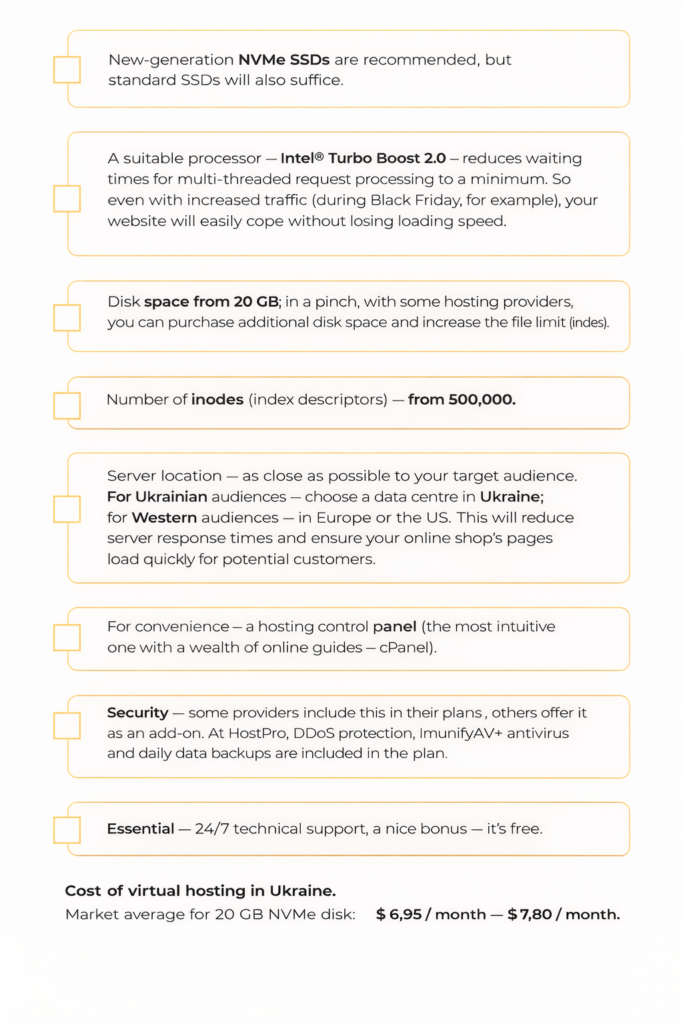
The cost of virtual hosting in Ukraine. The market average for a 20 GB NVMe drive: $6.95 / month – $7.80 / month
VPS
VPS (Virtual Private Server) — a type of hosting where a physical server is divided into several virtual servers, each with its own dedicated resources. An excellent solution for online shops with up to 15,000 daily visitors and a catalogue of approximately 10,000 product listings.
Thanks to KVM virtualisation technology, as a customer, you are guaranteed your own share of the processor, disk quota and RAM (random access memory), regardless of other customers on the server. A VPS offers greater flexibility in terms of OS choice, customisation (installing additional software) and, of course, more resources than shared virtual hosting.
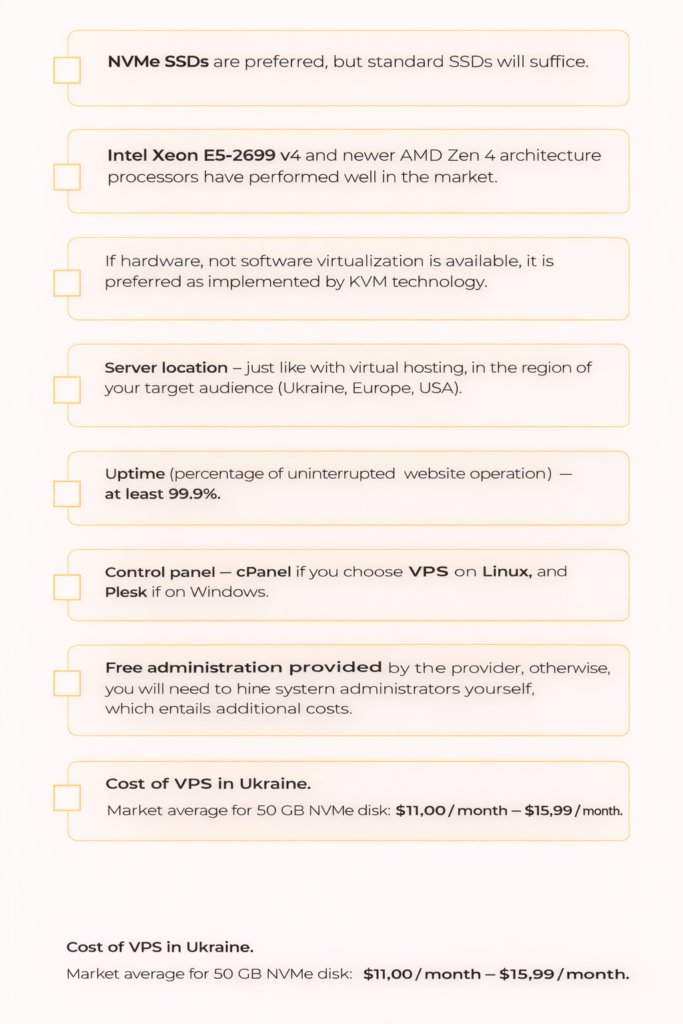
VPS selection checklist:
Dedicated server
Dedicated server — a type of hosting that gives you exclusive rights to rent a physical machine without any ‘neighbours’.
If your website generates more than 15,000 visits per day, you may already start to experience issues with speed and bandwidth on shared hosting or even on a VPS. Furthermore, if you are concerned about the security of your customers’ personal data, particularly the protection of credit card details, only dedicated hosting can provide you with the highest level of corporate security.
You can choose a server that is ready to go or build your own configuration.
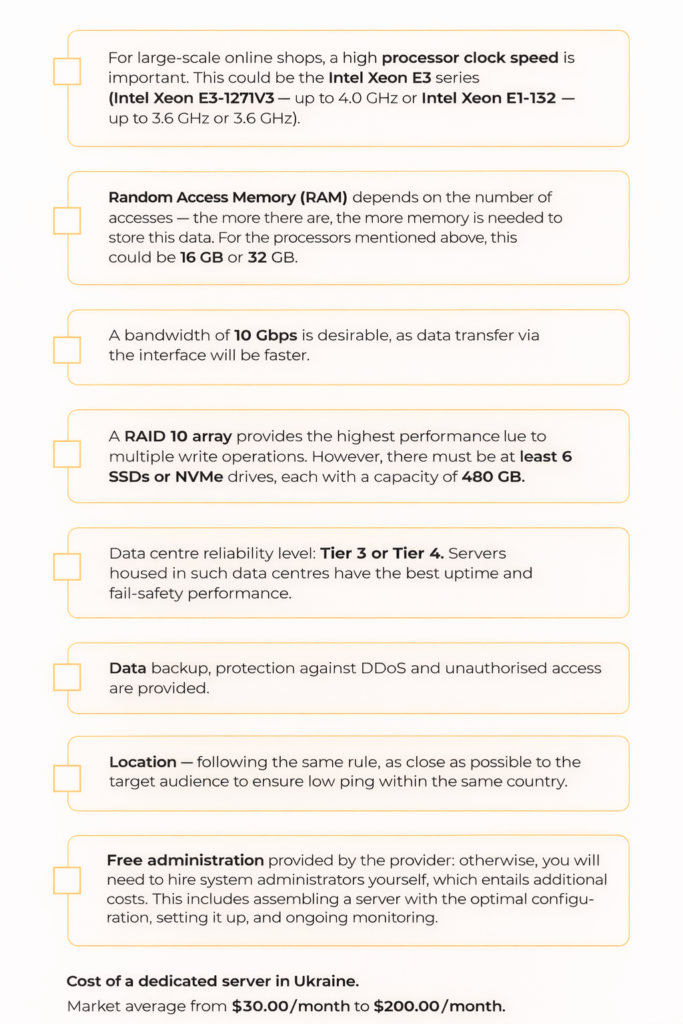
Checklist for choosing a dedicated server:
Why is it best to steer clear of free hosting?
- Limited resources — disk space and RAM. Let’s compare a server to a pizza: the more people there are, the smaller the slice you’ll get. It’s the same on free hosting servers. Due to a constant shortage of resources, your website may take a long time to load (over 3 seconds) or remain inaccessible altogether. For a website with high traffic and a bulky database, this is like shooting yourself in the foot.
- Advertisements on your website. This is how most free hosting providers make their money. An annoying user experience is, in effect, the price you pay for free hosting.
- Unreliability. Free hosting does not generate any revenue in itself, so the provider has little incentive to invest in infrastructure and a technical support team. This results in slow loading times and frequent downtime, which frustrates visitors and damages the site’s reputation.
- Security gaps. Providers on a tight budget are unlikely to invest in security scripts, DDoS protection, antivirus software, round-the-clock server load monitoring, and so on. The main risks are data breaches and malware infections.
- No support service, or an incompetent one. Speaking from personal experience, we can say that competent support is sometimes valued more highly than the actual hardware and software provided by the hosting provider. Something could go wrong with your website at any moment. With free hosting, you’ll most likely be left to deal with problems on your own.
In conclusion
Whether you choose a national, regional or thematic domain depends on whether you intend to generate traffic from a single country or whether your website will be multi-regional. It is also worth noting the restrictions that apply to domain registration in certain zones, such as .UA.
You should choose the type of hosting (shared hosting, VPS or dedicated server) based on your website’s traffic volume, as well as the amount of storage space required for photos and videos. For reliable hosting with 24/7 technical support and domain registration, contact HostPro. And use the promo code SOLVE-20 to get a 20% discount on all hosting and VPS plans.